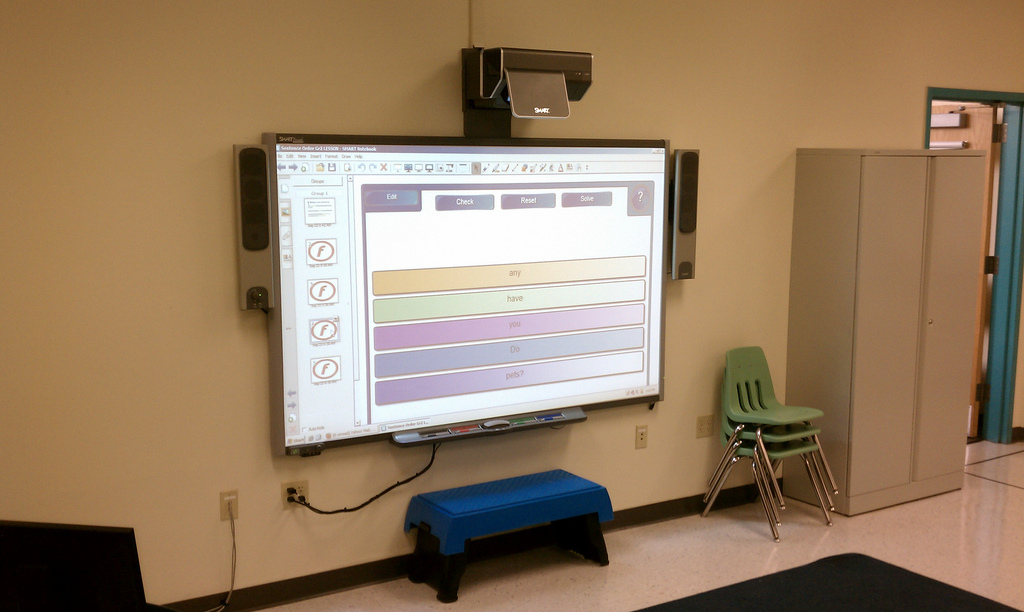
Video conferencing has become increasingly popular in the last 15 years due to increased convenience from like Skype and Google Hangouts. Although the technology has been around in one form or another since the 1970s, the advent of free Internet services has made public interest skyrocket. With technology continually advancing, video conference systems see widespread use today in business offices, schools, churches, and more.
Although anyone with a cell phone can use video communications today, there is a bit more sophistication to a true video conference system. Basic video conference systems run through a computer, using software and a webcam to transform the computer into a video conferencing device. This type of system can be on the low end of audio/video quality but is a good option to consider when budgeting or using a temporary set-up.
A dedicated video conference system will have permanent equipment installed. This type of system is generally used in locations where the video conference system will be used on a regular basis, such as an office meeting room. Special cameras in these set-ups are mounted to a fixed point but rotate via remote to focus on different parts of the room as needed. The audience in the room will generally use a large television or projector to display the people on the other end of the video call.
Video Conference vs. Telepresence
There are a few other terms out there that interchange with “video conference”, the most prominent of which is “telepresence”. A telepresence system is the big brother of video conferencing, featuring newer technology. Telepresence features clearer video, crisper audio, and superior connectivity. Using cloud-based technology, telepresence lacks the connectivity issues that can cause audio or video to unsync, dropped connections, or other problems that can crop up with subpar video conference systems.
Recently, telepresence has also been combined with other new technologies such as robots. Telepresence robots can be remotely controlled, allowing presenters to “walk around” on a stage for audiences even when they are not physically present. This allows for more hands-on interaction that can provide increased benefits over video conference in areas such as education.
Pre-Installation Tasks
Each installation is unique but they all start with the same thing: a site survey. Measuring the scope of your project is critical in determining what tools and equipment will be needed. Setting up a temporary teleconference system for a one-night event will be very different from installing something high-end and permanent. For simple projects like working with existing hardware, a phone call can be all it takes to start the project planning. For more detailed projects, a technician may need to come out and examine the site.
After the survey is complete, our team will formulate a custom plan for your facility. Factors such as the lighting in the room, default camera settings, and how the system hardware will interconnect will all be factored in here. Prior to the installation, our team can ship HDMI cables, mounts, brackets, and other necessary equipment directly to the job site. On the day of the installation, make sure there is a way for the installer to access the property. Ideally, this will involve having someone on-hand to let them in. This representative should also be able to point the installer to the work area as well.
Completing the Installation
With the materials already onsite, our technicians will unpackage everything and start prepping the walls by cutting holes for cables and hanging brackets/mounts as needed. Then the hardware will be mounted and connected, with cables being run through the walls, floors, and/or ceiling as needed. Once everything has been cleanly connected, the system will be tested to check functionality. After that, it is a simple matter of cleaning up the area and your new video conference system will be ready to go.
At INC, we perform video conference installations for schools, universities, offices, churches, hotels, news stations, and more. A properly installed video conference system not only looks crisp and clean but will also provide key functionality to day-to-day operations. Whether a video conference system is being installed from scratch or tacked onto an existing network, INC is ready to get the job done right.
If you have additional questions on this process, please call us directly at 888-519-9525 or request a quote here. Our team will work with you to prepare your custom installation project.
As mobile devices have become more prominent over the years, Wi-Fi has become critical for any organization wanting to keep up with the latest technology. From a small coffee shop to a massive hotel, businesses of all sizes use Wi-Fi to stay on top of their game. At INC, we design custom installation plans to maximize the effectiveness of Wi-Fi functionality in your building.
Advantages of Wi-Fi
Having been around for 20 years, Wi-Fi is a tried and tested technology in the modern world. Most electronics today, from cell phones to laptops to televisions, are built with Wi-Fi receivers. Wireless functionality results in a number of benefits for users:
Carry and use devices with network access anywhere in the building.
Allow network access on devices too small to house an ethernet port.
Provide easy access to new users and guests with simple interfaces for connectivity.
In terms of convenience, Wi-Fi wins out over older, wired connections.
Pre-Project Tasks
Before installation, there is a bit of prep work that goes into planning a Wi-Fi network. The job site will need to undergo two surveys: a cabling survey and a wireless survey. The cabling survey will examine the cabling infrastructure to determine where the wireless equipment can be most easily installed. This includes planning new cable runs to put the Wi-Fi equipment in the selected location.
The wireless survey focuses on your specific needs. Wi-Fi signals come in different strengths and the layout of the building will determine how the project needs to proceed. The construction of the facility also factors in here; thinner materials like drywall are easier for a signal to penetrate than more solid materials like concrete.
Wi-Fi signals also get weaker with distance, so larger buildings naturally need more powerful equipment. For example, a small office with ten people will require less overhaul than a school housing dozens of staff and hundreds of students. These factors and more make floor plans and related materials immensely helpful when conducting a wireless survey.
Once both surveys have been completed, our team of experts can formulate the best possible layout for the equipment installation. Equipment recommendations will be based on the performance needs of the wireless network. Factors such as data speeds, coverage areas, and security must all be taken into consideration. With those details ironed out, materials and equipment will be shipped directly to the job site for our installation team.
Completing the Installation
With the materials onsite, our technicians will run any new ethernet cable that is needed. Each new cable will be kept hidden and arranged neatly to preserve the aesthetics of the building. Then the modems, routers, antennas, and other hardware will be mounted and connected to the ethernet lines, getting the new wireless network up and running. These access points will be activated by our team, who will install any necessary security, firmware, and other software updates.
Each piece of new equipment is tested to ensure functionality and configure the new wireless network according to client specifications. This can include incorporating the Wi-Fi into your existing network when upgrading older systems. Once our technicians finish, your new Wi-Fi network will be up and running.
At INC, we perform Wi-Fi installation for offices, educational facilities, residential buildings, industrial plants, and more. Using wireless networks can make life easier on employees, enabling Internet access anywhere in a building for access to email, internal documents, and more. Whether a Wi-Fi system is being installed from scratch or tacked onto an existing network, INC is ready to get the job done right.
If you have additional questions on this process, please call us directly at 888-519-9525 or request a quote here. Our team will work with you to prepare your custom installation project.
Speaker installations are fairly straightforward, although there is a bit of planning to do before diving in. The first thing to ask yourself is: what kind of set-up am I looking for? A single speaker used for a classroom intercom is going to be a very different project than wiring up a new sound system in an auditorium. The first factor to consider is whether the speaker system should be mono or stereo.
A mono system will have one or more speakers in a single spot. That one area will be where all of the sounds from the system originate. In an environment like a meeting room, where audience attention will be focused on one spot, this is most people’s preference. Stereo systems use left and right channels to spread sounds around a room, allowing sound to come at the audience from all directions. This type of system is common in settings like movie theaters where audiences need to feel like they are at the center of the audio they are hearing.
Pre-Installation Tasks
Each installation is unique but they all start with the same thing: a site survey. Measuring the scope of your project is critical in determining what tools and equipment will be needed. A project installing speakers in one room of an office will be very different from installing an outdoor intercom system. For simple projects like working with a drop-ceiling or cutting into drywall, a phone call can be all it takes to start the project planning. For more detailed projects, a technician may need to come out and examine the site.
After the survey is complete, our team will formulate a custom plan for your facility. Factors such as how far apart the speakers should be, how much voltage is needed for each unit, and how high above the audience the speakers should be placed will all be factored in here. Prior to the installation, our team can ship speaker wire, mounts, brackets, and other necessary equipment directly to the job site. On the day of the installation, make sure there is a way for the installer to access the property. Ideally, this will involve having someone on-hand to let them in. This representative should also be able to point the installer to the work area as well.
Completing the Installation
With the materials already onsite, our technicians will unpackage everything and start prepping the walls by cutting holes and hanging brackets/mounts as needed. Then the speakers themselves will be mounted and wire will be run through the walls, floors, and/or ceiling, connecting the speakers to a media device or drop box. Once everything has been cleanly connected, the system will be tested to check functionality. After that, it is a simple matter of cleaning up the area and your new speaker system will be ready to go.
At INC, we perform speaker installations for schools, offices, restaurants, churches, hotels, retail stores, and more. A properly installed speaker system not only looks crisp and clean but will also provide key functionality to day-to-day operations. Whether a speaker system is being installed from scratch or tacked onto an existing network, INC is ready to get the job done right.
If you have additional questions on this process, please call us directly at 888-519-9525 or request a quote here. Our team will work with you to prepare your custom installation project.
Wiring infrastructure is the backbone of any network. Even if everything does seem all well and good, there could be room for improvement somewhere to increase network efficiency. If wires have been run incorrectly, that infrastructure may not be up to code. Whether it comes down to copper wiring, fiber optics, or equipment used to support the infrastructure like racks and cabinets, INC is ready to evaluate your facility.
Getting a second opinion never hurts; an extra pair of eyes can sometimes spot something that the initial installer may have missed. When testing a network there are three main steps: performing a visual inspection, taking measurements with tools, and providing documentation with test results.
Visual Inspection
A visual inspection is fairly simple and involves examining the cabling externally. If a cable is noticeably damaged with something like a kink in the wire or a worn jacket that has exposed internal components, that is an obvious problem. But checking for obvious damage is only the first part of this step.
Pathways such as conduit will also be inspected to ensure building codes are being met, within reason. Unless other problems are found when taking measurements later, it should not be necessary to pull cables out of the wall or anything like that. The examination will also include checking equipment rooms and telecom closest to looks for tangled wires along with any other potential problems.
As far as organization goes, cables will also be checked for labels. Oftentimes it may be difficult or even impossible to tell what cable goes where. This may not hamper day-to-day activities but it can cause major issues in the event of an emergency. Examining the placement of cables compared to other equipment is also critical to minimize signal loss from electromagnetic interference (EMI).
The ends of each cable will also be closely examined to ensure each connector is terminated properly. A loosely terminated connector can have a weak signal. It is also critical to check that the ground is connected properly, to avoid any damage to equipment or injury to persons.
Test Measurements
Once the visual inspection is complete, the next step is using testing tools. The exact type of tester used will depend on the type of cable or equipment being examined. In general terms, all testers perform the same function; ensuring that cables are transmitting a signal correctly. There are a few common tools that may be used during this step.
A multimeter is one of the most common testers used. It is a basic tool that does its job well and is used more than any other type of tester. Paired with copper wires such as coax or ethernet cable, a multimeter can test voltage, current, and resistance.
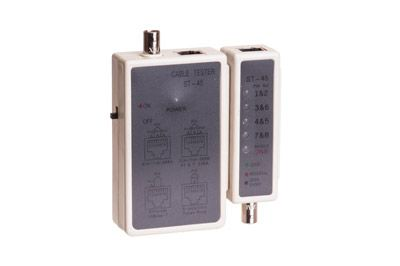
Another common device is simply called a tester. These simple devices that work in pairs to check pin configurations. The two units try sending electrical signals back and forth to each other. If one of the signals does not make it, a red light on the unit lets you know there is a problem.
A more heavy-duty version of a tester is called a tone generator, which is used with multi-pin connections such as telephone and ethernet lines. These types of cables contain multiple smaller wires on the inside and damage to just one can affect the performance of the whole cable. A tone generator tests these individuals wires one-by-one and can identify what kind of problem there is if an issue is present.
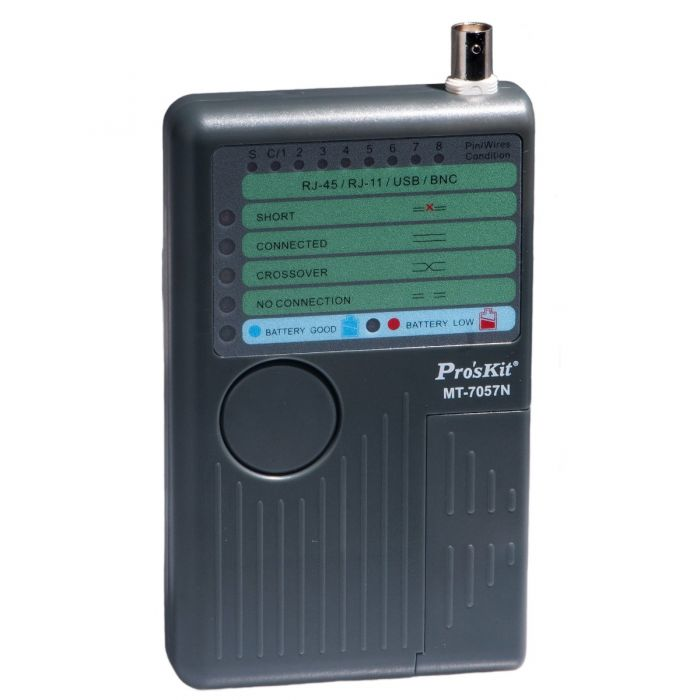
Cable sniffers, also called locators, support multiple types of cables such as ethernet, phone lines, coax, and even USB. Working in pairs, cable sniffers are used to test cables without having to plug them into actual equipment. A sniffer analyzes the signal going through the cable and can tell if there is a short or any other problem.
Phone systems can be tested with a butt-set, which is a two part kit. The first part plugs into a phone port and has several lines coming out that accept alligator clips. The main unit uses the aforementioned alligator clips and features a number pad to mimic a telephone, allowing for easy testing without having to hook up an actual phone.
All of these tools are just a few basic examples of what may or may not be used during an evaluation. The exact tools needed for the job will depend on what types of cables and equipment are being examined, but the testers listed above are among the most common pieces of equipment used for these examinations.
Documentation
Once the visual inspection is complete and the test measurements have been taken, INC will start compiling the results. We can translate the observations and raw data into an easy-to-read document. This documentation will be your written record of the testing and what you can wave at the next inspector who comes knocking.
If any issues are found, the documents will also include recommendations for improvements. In extreme cases, this could involve getting things up to code. But more often than not, there are simply a few tips and tricks that can be used to boost network efficiency with a little simple reorganization. These documents can be provided in paper or electronic formats, or both.
At INC, we perform testing for offices, educational facilities, residential buildings, industrial plants, and more. A simple wiring test is the start of preparing your building for improvements that can provide greater network speeds than ever before. Whether a network uses fiber optic, ethernet, or even wireless systems, INC is ready to get the job done right. h
If you have additional questions on this process, please call us directly at 888-519-9525 or request a quote here. Our team will work with you to prepare the site survey and customize your installation project.
“Structured cabling” is an industry term that gets thrown around a lot. Some people use it as just a buzzword, but it actually refers to how a cabling system is designed and installed within a building. Along with the cables themselves, this also includes any hardware being connected during installation plus anything else that may be added later on. Planning for the future is one of the major considerations when it comes to planning out structured cabling installation.
Network cables such as ethernet, telephone lines, coax cable, and fiber optics are all commonly found during these installations. Some general methodology does apply for all installations but it can change depending on what kind of facility is being prepared, such as standard practices for an office vs. a school. The individual, specific needs of each project allows for further customization from those guidelines on a case-by-case basis. In the United States, standards used for these projects are set by the Telecommunications Industry Association, specifically TIA/EIA-568.
Each blueprint for a structured cabling installation plan can be broken down into six sections: entrance facilities, equipment rooms, backbone cabling, telecommunications rooms, horizontal cabling, and work-area components.
Entrance Facilities
An entrance facility is the area where cables coming from utility providers stop and cabling classified as part of the building starts. This access point allows equipment inside the building to be connected to the Internet, telephone lines, and other local area infrastructure. It is commonly marked by a demarcation point. The entrance facility also includes entrance pathways, connecting hardware, transition hardware, and circuit protection devices.
Equipment Rooms
Equipment rooms are the central location for IT hardware used to run systems inside the buildings. They can be as the center of a network and are more expansive than telecommunications rooms. Equipment rooms feature heavy-duty hardware such as servers that are used to network the rest of the system together. This type of equipment is often stored on racks or cabinets for stability and security. An equipment room is generally off-limits to non-IT staff and temperature controlled to keep equipment running optimally.
Backbone Cabling
Backbone cabling refers to the wires used to connect the entrance facility, equipment room, and telecommunications rooms. Depending on the type of hardware being used in those locations, this can include ethernet cable, telephone cable, coax cable, and/or fiber optic cable. These cables handle the majority of traffic running through the network, hence the name “backbone”. Backbone cables can be divided into two sub-categories, intrabuilding and interbuilding. Intrabuilding cabling runs between different rooms in a single building. Interbuilding cabling is used to connect networks between two or more buildings. Along with the cables themselves, the term “backbone cabling” also refers to hardware used to install those cables such as conduit, firestops, and grounding equipment.
Telecommunications Rooms
A telecommunications room is an off-shoot from the main equipment room. Whereas the equipment room only connects to servers and other primary hardware, the telecommunications rooms will connect directly to user devices such as computers and printers. These smaller rooms will house the backbone and horizontal cabling, connecting them to hardware with smaller patch cables.
Horizontal Cabling
Horizontal cabling refers to cables that run between the telecommunications rooms and wall outlets. These cables are what allow individual computers, printers, and other devices to have network access. This term refers to cables used for Internet access and will consist of either ethernet or fiber optic lines depending on your network set-up. Since these cables commonly run through walls, ceilings, and floors, they often need to be plenum rated.
Work Area Components
Work area components are the cables used to connect end-user hardware to the horizontal cabling. Typically, this refers to ethernet patch cables running between the back of a computer and a wall outlet.
Benefit from Structured Cabling Today
Having a centralized hub for a network allows data to transfer faster. Imagine data needs to go from one computer to another. With structured cabling, it will go from Point A (Computer 1) to Point B (a telecommunications room) to Point C (Computer 2). It is possible to make direct connections between your hardware without structured cabling and crisscross everything together. But a network Frankensteined together will have fewer direct connections. Moving data might make it go from Point A all the way through Point M because all the equipment is connected haphazardly. Needless to say, going through a dozen connections takes a lot longer than going through three.
In the event of a problem, solutions are also easier to implement with a structured cabling system. With the more delicate parts of the system under the lock-and-key of trained IT professionals, human error is less likely to cause problems. If there is an issue, components can be fixed or replaced simply and rerouting network traffic to other parts of the system can reduce downtime as well.
At INC, we perform structured cabling installations for offices, educational facilities, residential buildings, industrial plants, and more. A simple site survey will allow us to start preparing a custom plan for optimizing hardware installation and network usage just for you. Whether a network uses fiber optic, ethernet, or even wireless systems, INC is ready to get the job done right.
If you have additional questions on this process, please call us directly at 888-519-9525 or request a quote here. Our team will work with you to prepare the site survey and customize your installation project.
Upgrading to new technology is great but it can put strains on older networks. While there is nothing inherently wrong with traditional copper cable, many businesses and other institutions are making the switch to fiber optic. Fiber cable can be run at greater distances and supports much higher data speeds than its older copper counterparts. With recent innovations in the technology, the once-fragile fiber cable is now more durable and simpler to install. For growing facilities that plan to expand their systems as the years go on, fiber optic is the best way to plan for the future.
Fiber vs. Ethernet
To understand the differences between ethernet and fiber, you need to start with how they work. Ethernet cables contain copper cores which transmit data through an electrical signal. While ethernet has evolved over the years, the fundamental technology remains the same. The major drawback of ethernet is that the electrical signals can be disrupted by electromagnetic interference (EMI). Anything that uses large amounts of power, from simple power cords to heavy industrial machinery, can generate EMI. As an older technology, ethernet will eventually reach its limit while fiber optic cable continues to improve.
Fiber cables transmit data using light (lasers) instead of electricity. These cables are filled with small pieces of glass that bounce the laser down the length of the cable. Since light moves faster than electricity, fiber cables are able to transmit data much faster than ethernet. Fiber optic cable does not suffer any ill effects from EMI or any other sort of interference. Think of the fiber optics and ethernet comparison as the same as DVDs and VHS tapes. VHS still saw use after DVDs were introduced, but were slowly phased out in favor of the new and improved technology.
Also note that fiber and ethernet are compatible with each other, so existing ethernet networks can be upgraded with fiber. Older networks do not have to be 100% replaced all at once. Upgrades can be gradually made over time.
Types of Fiber
Like ethernet, fiber optic cable comes in a few different flavors. The main categories are single-mode and multimode. Multimode can be further divided into OM1, OM2, OM3, and OM4.
Single-mode is used for long-range transmissions. Provided a powerful enough laser is being used to send the signal, a single-mode cable can run for miles by itself. Typically, single-mode sees use by the telecommunications industry. Single-mode fiber is usually color-coded yellow.
Multimode uses a thicker core than single-mode, which allows for more lasers to run through the cable. This, in turn, provides better signal speeds. OM1 and OM2 cables are color-coded orange and support up to 1GB data transfer speeds. OM2 is the newer of the two and capable of running for longer distances than OM1. OM3 and OM4 have a similar relationship, being color-coded aqua and supporting speeds between 10GB and 100GB depending on distance.
There are also different types of fiber connectors which come in a few different sizes and shapes. Exactly which type you need will be dictated by the equipment being used with the cables. This is something that will be evaluated during the site survey prior to installation.
Project Preparation and Execution
Before any installation, a survey of the job site will take place. A surveyor will come out to evaluate the premises, taking notes about the layout to determine what practices will be best for the install. This information will be sent to our expert team of Project Managers, who will then begin drawing up plans for the project. Once the plan is in place and approved, materials will be sent directly to the job site.
From there, one of our teams of installers will be dispatched. Our experts are capable of handling any fiber project, from a small office of a few hundred square feet to a multi-building complex that needs fiber optic cabling stretching for miles. After the cable is down, our team can use it to set up a new network or connect to existing infrastructure.
At INC, we perform fiber installations for offices, educational facilities, residential buildings, industrial plants, and more. A simple site survey is the start of preparing your building for fiber network installations that will provide greater network speeds than ever before. Whether a network uses fiber optic, ethernet, or even wireless systems, INC is ready to get the job done right.
If you have additional questions on this process, please call us directly at 888-519-9525 or request a quote here. Our team will work with you to prepare the site survey and customize your installation project.
So, you need a bit of cabling infrastructure work done. Maybe you are moving into a new office and need ethernet lines run. Or maybe some classrooms need projectors set up before the new school year starts. In any event, each project is going to be a bit unique. The existing infrastructure will determine which methodology is best for your particular set-up. Performing a site survey is crucial towards ensuring the rest of the project runs smoothly.
Prepping for a Survey
The goal of a site survey is for the surveyor to gain a full understanding of the project site layout. This knowledge is critical for formulating an installation plan. These professionals will need a few things from the client in order to conduct the survey successfully. Be prepared to work with them at the job site.
Someone will need to be at the project site to let the surveyor into the building. If the surveyor does not have a way in, the survey cannot be completed. The on-site representative should also be able to point the surveyor in the direction of the project site. For something like a demarc extension, this would be the MPOE (Main/Minimum Point of Entry), the spot where cables from the utility company enter the building. For something like a speaker installation, it will be whatever room the speakers are going into. Plan accordingly depending on what type of project is being surveyed.
If there is any documentation for the building, it can make the site survey quicker. Internally, this can include floor plans, roof plans, power plans, HVAC plans, and/or sprinkler plans. Externally, a site plan showing property lines, power lines, water pipes, gas pipes, trees, roads, and other obstacles can also be useful. Again, exactly what types of plans will help is going to depend on what kind of service the surveyor is examining the site for.
Brand-New vs. Upgrades
If a job site is new, site surveys and installations go very smoothly. The new cabling and other equipment can be run and set up fairly easily. Key considerations here include determining what kind of services will be needed (voice, data, video, etc.). The location of the equipment room is another critical factor, with that location acting as the hub of the network. What materials the building is made of is also a major factor, such as running cables behind a wooden wall vs. a concrete wall. The floor plans and other related documents will determine the best options when going through this step.
Available pathways are key when planning any infrastructure. Where are the pathways available? How much open space is there? Is there other equipment such as ventilation ducts that could get in the way? Where are outlet spaces available for connecting new lines? Any installation will be limited by the size and shape of the project site’s infrastructure.
When it comes to existing systems, there is a little more prep work involved. The site survey will determine where the new equipment will connect to the current infrastructure. This is typically determined by the location of an equipment room or telecom closet and what kind of space is available in the walls, floors, and ceilings between that point and the work site. For multi-building installations such as universities, this will include connecting to the main network.
The survey will also determine if additional equipment such as a rack or cabinet is needed. In areas holding heavy equipment, this involves checking the floor-loading capacity. If heavy equipment is needed, surveyors will also check if an elevator is needed and if the available elevators can also handle the size and weight of the equipment. It also includes making sure a ground is available for electrical connections.
Installation Safety
Getting equipment in place is one thing, but ensuring it will run safely is another matter. Electronic equipment is very sensitive and factors such as temperature control, humidity control, dust contamination, and other environmental conditions must be considered. Sources of EMI (electromagnetic interference) must also be located and marked to ensure any new equipment does not suffer performance issues.
In the event of an emergency, potential hazards also need to be identified. Are there fire extinguishers or a sprinkler system available? Are any fire barriers in place or are firestopping measures needed? Is emergency lighting available during a power outage? Is there any chance of the room being flooded? Precautions can ensure these and other factors have a minimum chance of causing equipment damage.
Along with safety, security must also be taken into account. Will any servers and related equipment be kept in a locked room? Where will the access point be and how will authorized users get in? Will there also be locked cabinets within the room? Keeping hardware secure is just as critical as keeping it safe and the two often go hand-in-hand.
Copper vs. Fiber
Fiber lines are becoming more popular but many installations still use copper to save on costs. Copper installations are still more common and take a few simple questions into consideration during a survey. What applications will be used (voice, data, POE)? What data speeds are needed? Modular or 110-type? T568-A or T568-B? Cross-connect or interconnect?
Fiber installations will have some of the same considerations, such as what applications are used and bandwidth requirements. Other factors unique to fiber such as single-mode vs. multimode will also need to be taken into consideration. Many of these unique factors are roughly equivalent to other factors that apply only to copper lines, so the site surveyor can help users compare and make recommendations.
Completing a Site Survey
Once a site survey has been completed, INC will start formulating a plan around the services needed to get the job site up and running. After that information is compiled, a quote will be prepared. The quote will point out any areas of potential concern noticed during the survey to ensure there are no surprises once the work starts. Different options may be available based on performance options and budgetary considerations. Increased performance is often worth a little additional investment, as is setting things up right the first time to avoid problems down the road.
At INC, we perform site surveys for offices, educational facilities, residential buildings, industrial plants, and more. A simple survey is the start of preparing your building for network installations, IT upgrades, cable management systems, and other services. Whether a network uses copper lines, fiber-optic cable, coax runs, or even wireless systems, INC is ready to get the job done right.
If you have additional questions on this process, please call us directly at 888-519-9525 or request a quote here. Our team will work with you to prepare the site survey and customize your installation project.
https://www.inc-installs.com/wp-content/uploads/2026/04/INC-Installs-Web-Logo.png00Patrick Giffordhttps://www.inc-installs.com/wp-content/uploads/2026/04/INC-Installs-Web-Logo.pngPatrick Gifford2019-04-10 07:00:422019-04-08 08:24:25Cabling Site Surveys
SAINT LOUIS, Missouri, Mar. 26, 2019 – INC Installs (INC), an Infinite Electronics brand providing network installation services across the continent, has hit a new milestone with 30,000 projects completed. Servicing both the United States and Canada, INC coordinates installation teams across North America, working with organizations ranging from small local businesses to household names such as Edward Jones, Dell, and Geico.
INC offers can coordinate with you for network installations and other related services. Some of our most popular options include site surveys, demarc extensions, fiber optic installation, wireless structure, speaker set-up, and more.
Each new project at INC starts with the client, examining the building layout and client expectations to craft a custom solution specialized for each project’s unique needs. Local installers will be dispatched, arrive knowing what to expect, and begin work immediately. Materials for the project are shipped directly to the job site, eliminating warehouse expenses. Whether it is a small 1-hour project or a major week-long installation, our teams are ready to get the job done today.
Since 1995, INC has developed a scalable and reliable network of thousands of trusted low-voltage cabling partners, audio-visual specialists and satellite technicians across North America to facilitate installations for our clients. Whether they need a demarc extension, structured cabling installation, an audio-visual installation or even some type of IT equipment installation, INC consistently delivers results and an excellent customer experience.
About Infinite Electronics:
Infinite Electronics is a leading global supplier of electronic components serving the urgent needs of engineers through a family of highly recognized and trusted brands. Our portfolio brands are specialists within their respective product set, offering broad inventories of engineering-grade product, paired with expert technical support and same day shipping. Over 100,000 customers across a diverse set of markets rely upon Infinite Electronics to stock and reliably ship urgently needed products every day.
The demarcation point (demarc) is the dividing line where your service provider’s equipment connects with your own. This spot determines who is responsible for the installation and maintenance of cabling and hardware. Equipment located before the demarc is the service provider’s responsibility. For any equipment located past the demarc, installations and repairs become your responsibility.
Demarcation point is typically abbreviated as “demarc” but has a few other names. Demarc is can be abbreviated as DMARC or a similar acronym. The acronym MPOE (minimum/main point-of-entry) can also refer to a demarcation point. Specifically, MPOE is the physical location where the equipment you own starts running.
Where Can I Find My Demarc?
Demarcs can be located either outdoors or indoors, typically in a location easily accessible to technicians. Common locations for a demarc include:
The outside wall of a building.
Inside the building near an electrical panel.
On an inside wall adjacent to where the phone line enters the house.
A common outdoor demarc mounted on a brick wall.
The exact location of the demarc point and related equipment often depends on the age of its installation. For example, a newer demarc mounted on an outside wall is commonly on the other side of the wall from a telephone jack. This may even be the demarcs test jack, one of the key features of any demarc.
A demarc for a single phone line (left) compared to a unit holding many lines (right).
Types of Demarcs
Network Interface Device (NID)
The network interface device (NID) is another name for the box that serves as a demarc. Of the various types of demarcs, a NID is the most basic. NIDs are commonly located outdoors, giving technicians 24/7 access. These boxes are small and weatherproof with various ratings set in place by the FCC.
Equipment for a NID is fairly basic, being a “dumb” system with no digital functionality. A standard NID includes wiring termination, a test jack, and circuit protection. Circuit protection is especially critical, allowing NID boxes to act as surge protectors for your building’s wiring. This is crucial for protecting wiring, equipment, and people from the electricity normally running through the lines as well as any excess energy, which can be anything from small power surges to lightning strikes.
The level of weatherproofing for a NID is classified into three different sections by the Telcordia GR-49: normal, severe, and flooded.
Normal conditions cover the weather in most areas where people live. This includes temperature ranges from -4 to 90 °F (-20 to 32 °C) with relative humidity below 90%. Contamination is not expected in areas where these boxes are used.
Severe conditions account for environments that exceed normal-rated parameters. These cover temperatures from 40 to 100 °F (4.5 to 38 °C) and relative humidity exceeding 90%. It also considers naturally occurring damage such as frequent lightning strikes, a high quantity of salt in the air, and fungus growth.
Even with the maximum number of precautions, there is only so much protection against Mother Nature. Equipment installed in these environments breaks down more quickly, suffering from problems such as low dielectric breakdown voltages due to exposure to high humidity. Improperly cared for or unreplaced equipment in these areas can cause signal degradation or even outages.
Flooded conditions refer to any area where a NID may be underwater for an extended period of time, such as on the coast or in a floodplain. It covers the same temperature range and relative humidity as severe conditions.
Note that these parameters do not determine whether your equipment will work during a flood. It determines whether your equipment can still function after the flood waters have subsided.
NIDs can be referred to by several names. Within the United States, other common names include network interface unit (NIU), system network interface (SNI), telephone network interface (TNI), and telephone network box.
A smartjack (intelligent network interface device, INID) is similar to a NID but with newer technology and additional features. These are commonly used for more complex types of telecom services, such as T1 lines. Whereas NIDs use simple wiring termination, smartjacks contain more sophisticated equipment such as circuit boards to allow for additional functionality.
Smartjacks are commonly used to provide triple play (telephone, TV, and internet) services. Some smartjacks will provide these services to a single building while others will extend to multiple outlets. While similar in functionality, the more advanced technology of smartjacks provides a number of advantages over NIDs.
Not every smartjack will contain the exact same equipment. While they do tend to be similar, the exact set-up may vary depending on your service provider as well as your needs as a customer. For example, some smartjacks may act like a repeater to increase the strength of your signal and overcome signal degradation for long cable lines. One major advantage of smartjacks is the elimination of running DSL directly into your building. DSL connected to pre-existing wiring often suffers from signal loss issues not present in smartjacks.
Along with hooking up your equipment, smartjacks can also be used to test your equipment if you begin having fuzzy phone lines, dropped internet, or other problems. This is done using a local loop (also called a loopback), which allows your telecom company to remotely test equipment without needing to send a technician out to you.
Most smartjacks are also equipped with some variety of alarm indication signal (AIS), which alerts the telecom company if something goes wrong with your lines. This is similar to those little lights on a home Internet router. When something is unplugged and those lights start flashing red, you are seeing a similar alarm in action on your side of the Internet line.
Optical Network Terminal (ONT)
An optical network terminal (ONT) is a demarc that uses fiber optic cabling (sometimes called a “light pipe”). While this type of demarc allows for extremely fast signal speeds, they are not able to provide power. They must pull power from an external source, usually by plugging into a regular wall outlet. Typically, they are also equipped with backup batteries to maintain your connection during power outages.
A traditional signal used by older types of demarcs runs an electrical signal on a copper line, sending those signals to TVs, phones, and computers. Fiber optic cables are filled with glass and use light (lasers) to transmit the signals much faster. The ONT converts those light signals into electrical signals compatible with the equipment in your building. Vice versa, any signals you send out (such as sending emails or making phone calls) are translated from electrical signals to light signals on their way out, allowing for high signal speeds in both directions.
While capable of superior signal speeds, ONTs are still fairly new with most areas not yet wired up for fiber optic services. One disadvantage they do have is that ONTs are digital only, causing compatibility issues with analog equipment. These demarcs are uncommon now, but we will be seeing more of them in the future.
Medium-sized businesses may struggle to get the bandwidth they need from copper lines, making ONT a good option to look into. This is especially true for services that use large amounts of bandwidth such as call center operations, real-time video transmission, large-scale data storage and recovery, and Internet Service Providers.
An open ONT box mounted outside on a brick wall.
Demarc Terminology
Plain Old Telephone Service (POTS)
Plain old telephone service (POTS) is the most basic type of phone service, commonly used in homes and small businesses today. These are typically used in conjunction with NIDs. While limited in capability, POTS is reliable and most often used for landline phones, alarms, and fax machines.
Digital Subscriber Line (DSL)
Digital subscriber line (DSL, originally called digital subscriber loop) allows for a computer to connect to the Internet using a telephone line. These allow for the use of Internet and phone at the same time, unlike older dial-up connections. While not as heavy-duty as T1 connections, they are considered adequate for home usage and small businesses. They will also require you to use a DSL filter to maintain compatibility with older POTS lines.
T1
T1 (T-1) is a type of digital phone service capable of supporting up to 28 digital voice lines or 48 VoIP lines. It can carry up to a total of 1.5 Mb of bandwidth. This type of line is very common for mid-sized businesses, allowing companies to minimize costs for per line voice connections, Internet connections, or connections to remote sites over a private network. T1 works by using two pairs of copper wire, one for sending signals and the other for receiving. The maximum distance of T1 is 655 feet (200 meters) past the demarc.
T1 can also be referred to as DS1 or DS-1 (Digital Signal 1). There are two variants of DS1 with T1 being the variant used in the United States. Introduced in 1962 by Bell System (AT&T), T1 is commonly used to this day.
Analog
An analog phone is the old school, traditional phone usually connected to a landline. These phones are limited compared to their newer, digital counterparts. Most analog phones today are found in businesses or places where they can be used as an emergency line, such as an elevator. While an analog phone only works with an analog signal, the use of a converter can allow them to be used with newer technology.
Analog phones do tend to have better sound than digital phones. It also costs less with phone companies to make analog calls. The downside here is that analog signals (usually) only work with a traditional phone you can plug into the wall. While it is possible to talk on a cell phone using an analog signal, few cell phones support it and it is often more trouble than it is worth. Analog signals are also voice only; they cannot send data like text messages or pictures. While they can be used wirelessly (like a home cordless phone), these have a very limited range.
Digital
Digital phones use signals similar to ones used by computers. The outgoing voice signal is broken up into data, sent through the phone lines to the person you are speaking with, and then changed back into a voice signal for them to hear. These are commonly used on cell phones as well as modern office phones.
Because the signal is being transmitted as data, a digital line has greater security than its analog equivalent. With the signal effectively being computer code, that data can be encrypted before it is sent down the line. Digital signals are also less prone to interference, lowering the chances of having problems like static or a weak signal. A phone (or any other device) set up for a digital signal will only work with a digital signal. If you are using it with an analog or VoIP connection, you will need a converter.
VoIP
Voice over Internet Protocol (VoIP, also referred to as broadband phone) is a phone that uses a computer network to communicate. VoIP is generally used on a private network to maintain clear sound quality on calls. While it is possible to use VoIP with a public network, it usually results in a lot of static and dropped calls. Depending on the service provider, you may be able to only call other VoIP users on your network or you may be able to call any phone number.
Talking through a computer eliminates the hassle of having an actual phone, but there are a few disadvantages as well. Unless your computer is using a backup battery, you will find yourself without a phone during a power outage. VoIP may or may not directly connect to 911 emergency services like a regular phone. This will depend on your service provider as well as your location and is a good thing to read up on before setting up a VoIP. VoIP phones will also only work with a VoIP signal; using an analog or digital signal with a VoIP phone will require a converter.
Quality of Service (QoS)
Quality of Service (QoS) is a function on VoIP networks to keep your calls clear. This feature gives your calls priority over any other network usage, such as Internet browsers, in order to maintain call quality. While most private networks set up QoS by default, it cannot be used on a public network. Without QoS enabled, VoIP calls can easily become bogged down by congestion in your network.
Power Over Ethernet (POE)
Power Over Ethernet (POE) is commonly used to provide VoIP phones with power, allowing the phones to function without a wall outlet. These are ethernet cables that can transmit power along with data. Along with VoIP phones, they are also used with IP cameras, wireless access points, network routers, and more.
Private Branch eXchange (PBX)
A Private Branch eXchange (PBX) is another name for a privately owned telephone system. This term commonly describes the set-up inside an office building, with desk phones and other lines hooked into the main line that actually goes to the demarc. Any basic office phone function, from transferring calls to using voice mail, likely utilizes PBX.
PBX is the type of phone system where you have to dial another number (usually 9 or 0) to make an outside call. The computer managing the functions of a PBX is called the Control Unit. Most companies utilize PBX as a cost saver, allowing users to avoid having to pay for an individual line for every single phone in the building.
Demarc Extensions
A demarcation point extension (demarc extension) is the process of connecting your customer-premises equipment (CPE) to the Public Switched Telephone Network (PSTN), as defined by the FCC. Cabling from the demarc must extend to a wiring closet or data distribution system to integrate with your network. The exact details will depend on the demarcs location and your building’s layout.
A diagram displaying a basic demarc extension.
Demarc extensions, like demarcs themselves, have many names attributed to them. They can also be referred to as extended demarc, DMARC extension, CPE cabling, service interface extensions, circuit extension, inside wiring, or riser cabling.
Checking the Test Jack
If you notice problems with your line, such as no dial-tone or static, you can use your demarc for a little troubleshooting. This will help you determine where the problem is located and may save you a service call fee from your telecom provider.
Open up your demarc box (this will usually require a screwdriver) and look inside for a phone plug. This is what connects your lines to the Public Switched Telephone Network (PSTN).
Disconnect this line and hook up a standard corded telephone in its place to test the line. Listen for a dial tone and try making a call to see whether the line works.
If you are still experiencing issues, the source of the problem is somewhere in your building. That will mean the issue of fixing it lands on your shoulders.
If you plug the phone in and it works, that means your telecom provider is the one with faulty equipment. This will be the time to contact them, so they can begin repairs ASAP.
Any and every demarc is classified as the property of the telephone company. Any equipment extending from the box to your building will be your responsibility, but the demarc itself should be handled by your service provider in the event of equipment failure. Most demarcs are covered in warning labels saying something to the effect of “ISP Access Only”, so proceed at your own risk if you decide to check this yourself.
Anytime you notice issues with your signal, it could have a number of potential causes. In some cases equipment simply goes bad over time, although this is a fairly rare occurrence. There is also the possibility of damage, such as a neighbor accidentally cutting a line while digging or a rodent chewing through wires. Interference from other devices, like a newly installed alarm system, could also interfere with your building’s wiring.
History of Demarcs
Prior to 1984, the Bell System Companies (AT&T) held a monopoly on telecom systems and did not allow the use of third-party equipment. After an 8-year antitrust lawsuit against the company (United States v. AT&T), Bell System Companies was broken up into a number of smaller “Baby Bell” companies. Once the deregulation kicked in, demarcs began becoming commonplace as federal law now required local access providers to implement them.
Unfortunately, the division of Bell System Companies also eliminated the standardization of equipment. Over the next 13 years, multiple revisions would be made to the 1984 ruling. The first of which took place in 1990, when the demarc was more clearly defined by the FCC. They introduced the 12-inch rule which stated, “The demarcation point may be located within 12 inches of the point at which the wiring enters the customer’s premises.”
The Telecommunications Act of 1996 made major changes to telecommunication law, being the first of its kind since the Communications Act of 1934. The FCC stated that the amendment was intended to “let anyone enter any communications business – to let any communications business compete in any market against any other.” In layman’s terms, this revision allowed for the sale and usage of third-party equipment. It also legally included the Internet as a telecom service for the first time.
Finally, in 1997, the 12-inch rule was expanded with a little extra wording, “…or as near thereto as practicable.” Adhering to the 12-inch rule had been somewhat troublesome in some locations due to building layouts. This amendment made the task of installing and maintaining demarcs in accessible locations more feasible now that less red tape was involved.
While these later rulings helped move things along, we presently still lack a national standardization for demarc extensions. The lack of a rulebook has led to poor installation practices stemming from that confusion. Despite living in the Information Age, this crucial feature of Internet access is still plagued by connection losses, slow service, and untimely repairs.
Demarc Standardization (or Lack Thereof)
While changes to the law did break up a monopoly, one of the drawbacks was the loss of standardization for demarcs. With anyone and everyone able to manufacture and use personalized equipment now, there was no longer a list of rules that the industry as a whole agreed to follow. The Commercial Building Telecommunications Standard (ANSI/TIA-568.1-D), for example, does not actually discuss the demarc extension. This lack of definition has resulted in some facilities receiving fairly messy installs over the years, as efforts to restore standardization for demarc extensions are ongoing. A poorly installed demarc might not even be labeled properly, making finding the right circuit when a repair or new installation is needed costly in time, money, and manpower.
Cleaning up an existing demarc can be just as critical to business operations as installing a new one. If something goes wrong with an ethernet cable in an office, someone’s computer will lose network connectivity and that employee’s productivity will drop down to zero until the connection is repaired. If the something goes wrong with a demarc, that productivity drop will happen to everyone in the entire building.
Think of this as the same as taking your car in for preventative maintenance. You can get a quick, easy fix now or wait until something breaks and deal with that crisis when it happens. Obtaining and maintaining a clean, smoothly running system may cost a dollar now, but it will likely save you ten dollars down the road.
Installing Demarc Extensions the Right Way
Installation Preparation
Demarc extension installations have a few common problems associated with them. The most frequent issue for businesses is access. In an office environment, demarcs are commonly installed in small spaces like telecom rooms inside utility closets. Rooms like these tend to become cluttered, making it difficult for technicians to even reach the demarc, let alone work on it.
Another potential issue is coordination prior to the installation. Someone on-site will need to be ready to work with the technician, providing access to the right parts of the building. Some services related to demarc extensions, such as T1 installations, will also require prep work before the technician arrives. There will also need to be communication with your telecom provider so that technicians can test everything properly once the demarc extension is installed.
With a demarc extension running new cabling, you will want to make sure there is enough space available. If the new cables need to go through a hole in the wall that is already stuffed full of other lines, that will likely cause an issue. In older buildings, some existing cables may even be for old systems that are no longer in use.
Doing a little preparation will allow technicians to do their job quickly and efficiently, ultimately resulting in less downtime and getting your building up and running in a timely manner.
Installations Customized For You
Whether you are using a POTS, DSL, or T1 line, our installation team at INC Installs (INC) will prepare a customized plan for your facility. With each and every installation having unique needs, our services can range anywhere from simple cable extensions to full-service network integration. INC has experience performing demarc extensions in a variety of facilities including warehouses, offices, schools, shopping malls, and high-rise buildings.
Our technicians will run your cabling while neatly arranging and concealing the lines. These layouts are organized to be easily accessible for future use while remaining aesthetically pleasing. Taking demarc extensions a step further, our teams can also connect these new systems into your network.
For larger networks, systems exceeding the size used by a small business, it is often necessary to create structured-cabling solutions. Depending on the needs of your system, our technicians can connect the Main Distribution Frame (MDF, also called a shared telco closet) to Intermediate Data Frames (IDF) using 4-pair, 25-pair, 50-pair, 100-pair, 200-pair, or fiber optic cable. These can be arranged as individual horizontal distribution systems (to connect to individual workstations) or as a backbone distribution system that utilizes vertical distributions, for settings such as high-rise buildings or long hallways.
Once the new demarc extension is installed, our technicians can perform a test run once your telecom provider has made the new circuit live. Simple test signals will be sent through the lines to ensure all equipment is communicating properly. Our experienced technicians can work directly with the telecom company from your side to ensure that everything is working correctly.
To set up a new demarc extension, it may be necessary to install a router configured to receive data signals from a specific source. Our technicians are as fully skilled in this area of installation as they are with running new cabling and will make this process simple and clean.
The entire process of installing a demarc extension can seem daunting, but our experts will make the installation as fast and smooth as possible. If you have additional questions on this process, please call us directly at 888-519-9525 or request a quote here. Our team will work with you to customize your installation and ensure your demarc extension is up and running swiftly.
https://www.inc-installs.com/wp-content/uploads/2026/04/INC-Installs-Web-Logo.png00Patrick Giffordhttps://www.inc-installs.com/wp-content/uploads/2026/04/INC-Installs-Web-Logo.pngPatrick Gifford2018-08-16 10:17:252018-08-17 07:27:55Demarcation Point (Demarc)
Mankind has made significant bounds in technology and I was researching some information on the origins of telephone lines and cables. I came across Johann Philipp Reis. This man worked before any of the big names associated with the telephone, like Alexander Graham Bell. Here is an article I found on this forgotten man.
Johann Philipp Reis
The work of Reis predated that of Bell and Edison, and so he may well have invented the first telephone by some definitions. Unfortunately, due to technical problems, politics and commercial considerations, he did not receive the credit he was due during his lifetime.
Reis was born in 1834 in Gelnhausen , a little town in Germany. His father died early, and Reis was destined to become a farmhand, but his intelligence was noted by the local schoolmaster. He was sent off instead to Garnier’s Institute in Friedrichsdorf to further his education. He learned French and English and little other useful knowledge apart from what the school library offered. When he was fourteen he moved to Hassel’s Institute in Frankfort-am-Main. Here he learned Latin and Italian, this being considered appropriate education in those days. His interest in science began to show out, but it would not pay the bills. An uncle apprenticed him into the “colour trade”.
Reis continued to study in his own time, and took private lessons in mathematics and physics. He also attended the lectures on Mechanics run by Professor Bottger at the local Trade School. When his apprenticeship ended he moved to Frankfurt to Dr Poppe’s Institute. He privately taught other students Geography, which was not taught at the school, and found he enjoyed teaching. He also found the time to join the Physical Society of Frankfurt.
His first paper, “On The Radiation Of Electricity“, was submitted to the Annalen Der Physik journal in 1859. It was rejected, which was a blow to the sensitive young man.
Reis turned his attention to building a device to transmit sound by electricity. He started to achieve some success, and it is noted that the first words successfully transmitted were “the horse eats no cucumber salad”. The results were encouraging, and he submitted another article to the Journal in 1862. This was also rejected, but it is significant in that he called his device a “Telephon” – the first appearance of the name in connection with electrical sound transmission. His device was based on the theories of M. Charles Bourseil, a French telegraphist, who in 1854 suggested a device that would make or break an electrical current under the influence of a diaphragm. The make-or-break current would then generate a similar sound in a receiver. Bourseil stated prophetically “in a more or less distant future, speech will be transmitted by electricity“. He actually built such a device, but found its adjustment was critical and its results inconclusive, so he did not proceed with it.
Reis knew of the principle of the “Page Effect”, which later became known as Magnetostriction. An iron needle or rod surrounded by a coil of wire would be moved by a variable current flowing through the coil and produce a “tick” sound. A succession of ticks generated a tone, which Page called “Galvanic Music”. Reis used this principle to build a basic receiver, and attached the mechanism to part of a violin to act as a sounding board. His transmitter was carved out of a beer barrel bung in an approximation of the human ear. A sausage skin formed the diaphragm. A tiny strip of platinum glued to the diaphragm acted as one electrical contact, and another bead fixed to an adjusting screw as the other. The device worked, to everyones amazement. It is now held in the Reichs Post-Amt Museum in Berlin. It transmitted simple musical tones, but could not handle the complex waveforms of the human voice. He published his results in the Jahresbericht journal in 1861 after demonstrating it to the Physical Society of Frankfurt. It worked at the demonstration by means of constant critical adjustment. Reis recorded that “the consonants are for the most part tolerably distinctly reproduced, but the vowels not yet in an equal degree“.
Left: Second version, 1861
Left: Third version which briefly went into commercial pproduction by Albert. 1882.
Left: Final version, by Hauck.
Improvements followed in the second and subsequent models, but apart from a few muffled words here and there it was never a reliable transmitter of speech. The third and later models used a cubic block of wood bored out in a cone shape, with the diaphragm across the top. The small platinum strip was replaced by a centre contact held against the diaphragm by a metal tripod spring arrangement. Sound was fed to the diaphragm by a speaking tube. It was put into limited production by J Albert of Frankfurt and later by Hauck of Vienna.
Despite the Telephon’s less than impressive performance it was widely noticed in scientific circles. During its production, information and copies were sent abroad. It was demonstrated before many scientific societies, but the results were still generally disappointing.
“…The sounds transmitted by Reis’s telephone are rather weak and muffled. Moreover they do not perfectly preserve the timbre peculiar to the sounds imparted to the transmitter. Nevertheless they permitted differences in quality to be observed. Professor Bohn says that in the early experiments of 1864 the son of Privy Councillor Jhering of Giessen was found to be a better speaker through the telephone than most other persons, and that it was easy to distinguish the voice of a boy from that of a girl. Reis himself states that, when chords struck on the piano were transmitted, a person having a musical ear could in the majority of cases distinguish the various notes in the chord…” “The fundamental ideas of Reis were based on the construction of the human ear. He had set out with the direct intention of transmitting speech electrically, as he states in the opening sentence of his first paper on the subject, communicated in October 1861 to the Physical Society of Frankfurt-on-the-Maine. But he was at first baffled by the difficulty of finding a form of apparatus that could respond to all the various tones that are simultaneously used in speech……At last he saw that the human ear itself solved the problem, and furnished a sort of type of the requisite mechanism. His first experimental transmitter was therefore an “electric ear”. It is still preserved in the Patent Museum in Berlin….
From Electricity and Magnetism, by A Guillemin, published in 1891 by Macmillan, London and New York. Chapter 7 pages 688-693.
It was only after the introduction of Bell’s telephone as a practical device that the importance of his work was fully recognised. This was mainly as a result of the court cases that tried to annul Bell’s patent by citing Reis as the true inventor. When Antonio Meucci challenged Bell’s patent, he was able to append sixty one scientific articles citing Reis as the inventor of the telephone.
Amos Dolbear used Reis’ work to prove the validity of his own phone. When Bell brought the inevitable patent infringement suit, Dolbear set out to demonstrate in court that Reis’ 1860 telephone worked. This would make Bell’s patent invalid. The demonstration became an embarrassing disaster for Dolbear. Electricians, lawyers and learned Professors tried to coax speech out the reluctant Telephon, but all they could get from it was squeaks and muffled noises. One of Dolbear’s lawyers said in frustration “It can speak, but it won’t.”
Reis received some renown at this time, but since the invention did not appear to be proceeding anywhere it was gradually dismissed as a scientific curiosity or “philosophical toy”. Again, Reis was disappointed .
The weakness of all his models was the make-or-break nature of the circuit. Up to a point this actually worked, as a sort of loose-contact transmitter. As soon as the voice became loud the circuit would break and there would be no further transmission until a return spring reestablished the contact. These breaks destroyed the clarity of the speech, and also Reis’ claim to have invented a telephone. It was not until Berliner put an induction coil across the transmitter that the sound became loud enough and unbroken.
Berliner later used the loose-contact principle to produce his (workable) transmitter. The similarity between his design and Reis’ is unmistakable. The difference was that Berliner deliberately set out to use the loose-contact principle, while Reis bypassed it and stuck doggedly to make-or-break, overlooking the fact that his transmitter did actually work at low volume. He continued to stress make-or-break in his documentation. It was this that cost him the glory of being upheld as the telephone’s inventor in the U.S courts. In 1881 Judge Lowell of the U.S. Circuit Court of Massachussetts ruled “The deficiency was inherent in the principle of the machine …. A century of Reis would never have produced a speaking telephone by mere improvement in construction“. That about summed it up.
Prof. David Hughes found that by using carbon rods he could make a microphone that worked by variable pressure, and was far more sensitive than the Reis transmitter, but he found the same problem as Reis and Berliner – at high volumes the circuit failed as the carbon pencils broke contact. His work predated that of Berliner, so he was unaware of the beneficial effects of an induction coil.
It is interesting to note that both Bell and Edison later acknowledged Reis’ work as part of the inspiration for their own, once the court cases had settled down. In Britain, where Reis’ work was well known, Bell’s patent application was tactfully called “Improvements In Electric Telephony and Telephonic Apparatus“.
Reis’ health was failing with the onset of tuberculosis. He found it difficult to keep up his teaching duties, and work on the telephon was suspended. He died on January 14, 1874. Reis’ work and achievements were later suppressed by the Nazis because he was Jewish, and have only started to be acknowledged again in recent decades.
There are some interesting footnotes to Reis’ work. When the Western Union company realized that Bell’s telephone was starting to affect their revenue, they employed Edison to develop a competing phone for them. William Orton, the president of Western Union, gave Edison a translation of Reis’ work as a starting point for his research. Edison’s first carbon phone is very similar to that of Reis’ apart from Edison’s use of a carbon diaphragm. Orton later commented “I find it amusing that Bell is perceived as the man who spent his whole fortune defending his patent on the phone, when in fact all he did was spend his whole fortune patenting Philipp Reis’ work”. Ironic, and partly true.
A development of Reis’ phone went into commercial production for the Dakota Emner Telephone Company and the Aberdeen Telephone Company in the U.S. in 1866. It was probably based on the second model, the most robust and simplest to build. The little information surviving does not give much detail. The phones were made by John Zietlow, a German immigrant, and Charles Emner, an electrician and discharged convict turned real estate agent. The companies were quite successful in their area, and their telephones were never challenged legally by the Bell company. Zietlow’s modifications apparently worked very well.
The British Post Office later examined Reis’ phone and concluded that with very careful adjustment it would definitely transmit speech. Their engineers used a stepup transformer and a modern receiver, which gave some improvement to the Telephon’s low output (and confirmed its shortcomings). The BPO carried out its examination in 1932, and STC reexamined the transmitter in 1947. They confirmed the BPO’s findings. They did not publish their conclusions at the time as they were engaged in negotiations with AT&T, the Bell company. Although these experiments are interesting, they highlight the reasons the Reis Telefon did not work – a lack of continuity in the circuit, and when it did work the signal level was too low to be practical. The experiments are often used to “prove” that Reis’s Telephon did indeed work and he was the true inventer of the telephone. It did work, but in the Reis form it was impractical. In fairness, the science of coils and transformers had barely begun and Reis would not have had the technology available to him.It was left to other inventors like Bell and Berliner to overcome these problems and produce a reliable workable phone.
In belated recognition of a worthy man, the Philipp Reis Prize is awarded each two years since 1987 to a promising German inventor.
https://www.inc-installs.com/wp-content/uploads/2026/04/INC-Installs-Web-Logo.png00Patrick Giffordhttps://www.inc-installs.com/wp-content/uploads/2026/04/INC-Installs-Web-Logo.pngPatrick Gifford2015-06-11 15:00:352019-04-03 15:02:25The Forgotten Johann Philipp Reis