
Solving Infrastructure Challenges in the New Work Environment
The Covid-19 pandemic and the subsequent economic fallout has exasperated the challenges and opportunities that businesses face. Balancing employee health and safety, digital and telecommuting policies and the re-evaluation of the need to occupy physical space are just a few of the challenges rising to the forefront. As many businesses now re-think what the future of work will look like we want to examine “workplace 2.0” from the lens of facility connectivity.

National Technology Rollouts Done Right
The final phase of many IT projects involves the rollout or deployment of the technology in the field. This includes both new technology implementations as well as upgrades. Internal complexities and external factors complicate the rollout phase and can threaten the timetable of the project. Some of the typical challenges companies face include identifying qualified technicians at each location, ensuring the installation is completed in the appropriate timeframe, managing varying quality expectations, and handling different communication methods. It seems like all you are doing is putting out fires.
Through our more than 25 years of experience, we’ve identified a few essential elements of a smooth technology rollout.
Paging Systems

To many people, pagers are synonymous with the 1980s and 1990s. There was a time, before the advent of cell phones and email, that many people across the world carried pagers and used them every day. Pagers are fairly simple devices to use. Sending signals in a manner similar to email, pagers are limited to simple text and number based messages. This simplicity is actually one of the biggest advantages of pagers today as is provides increased security. Since pagers only receive messages and cannot send them, a pager cannot be tracked like a cell phone. Pagers do not store information they receive either, making them a non-target for hacking.
While the invention of more sophisticated mobile communications technology did render pagers obsolete for the average Joe, there is still a market for pagers today. Several industries still make use of these aged pieces of technology and none of them are as niche as you may think. Some of the most critical professions to maintaining the well-being of society would not be possible without pagers there to back them up.
Who Still Uses Pagers?

The first industry that still uses pagers is one of the most important: the medical field. Many hospitals cannot use cell phones due to interference with hospital equipment, making pagers the next best choice. This extends to other emergency workers as well, namely EMTs and firefighters. Nuclear engineers are another group that uses pagers since their signals are able to penetrate walls equipped to block radiation, unlike the signals used by cell phones. The features provided by pagers even make them useful to birdwatching enthusiasts. But what exactly are all these valuable features?
As mentioned above, pagers do not store information. This is a key feature for hospitals and other medical facilities in order to stay in line with HIPAA by preventing data theft. Secondly, pagers transmit signals via satellite instead of cell towers. In the event of a natural disaster like a tornado, pagers can still work while cell phones may be out for days while service is restored. Pagers also have the benefit of being extremely cost-effective. The average cell phone costs over 5x more than a pager to operate, not to mention the pager itself and associated equipment like signal boosters also have much lower start-up costs.
Pre-Installation Tasks

Every installation project, including the installation of paging systems, begins with a site survey. This is the planning phase of the project where professionals will examine blueprints, floor plans, and any other charts or diagrams that detail the layout of the building as well as any existing infrastructure that will be nearby and/or directly interact with the paging system. For simple, small-scale projects, these documents may be all that is required to prep an installation plan. For larger facilities, it may be necessary for a surveyor to examine the site and take notes in person.
After the site survey is wrapped up, the information will be compiled into an installation plan. Factors such as the size of the building, signal strength needed to penetrate rooms with shielding or thick walls, and existing wiring that will interface with the paging system will all be taken into account. Prior to the installation, materials needed to complete the install can be shipped to the job site directly. These materials typically include wall mounts, brackets, speaker wire, and related equipment needed to implement the paging system. On the day of the installation, make sure that someone is present to let the installer onto the premises or there is some other way for the installer to access the facility.
Completing the Installation

With the work materials shipped to the site ahead of time, the installer will begin work upon arriving. The first step will be prep work such as running cables through the walls and installing mounts and any other necessary framework. Once those components are in place, the paging system itself can be installed and tested. After the settings are configured and the new paging system is confirmed to be up and running, the installation will be complete.
At INC, we perform paging system installations for all manners of facilities across America. Communications will never be disrupted with the implementation of a proper paging system. If you have additional questions about this process, you can reach INC directly at 888-519-9525 or request a quote here. Our team is ready to help you prepare your custom installation project today.
Digital Signage

Digital signs are used in all manners of businesses today. Any sign that needs to be changed or updated frequently can be easily altered at any time through the use of digital technology. Gas stations, airports, restaurants, and more all make use of this technology day. Need to update gas prices? Do it on the fly. Need to change a plane’s departure time? That can be done instantly. Switching between the breakfast and lunch menu? Digital signs have that covered too. Digital signs are a must-have technology for businesses who want to keep up with competitors in the modern world.
Using a digital sign is a simple process; they are commonly controlled from a computer referred to as a media player. Actually getting the sign initially installed is a bit more complex. Examining where the sign needs to be placed and implementing the best solution towards that goal is a critical first step for any installation project. Furthermore, it is also key to ensure that the end result will look clean and professional to attract the eye of customers and other users.
Types of Digital Signage

Digital signs are a newer technology and really only caught on in recent years, once LCD screens became less expensive to manufacture. There are three main variants of digital signs available: dot matrix, media player, and interactive.
Dot matrix is the oldest option for digital signage. These use a grid of LED lights to spell out letters and numbers or make simple images, like an old scoreboard in a sports stadium. This type of digital sign lacks a media player and must be updated manually by users. Dot matrix signs are commonly used with businesses that need to update their information at infrequent intervals, such as gas stations.
Media player signs use some sort of computer, such as a PC or even a simple DVD player, to put digital media on the screen. This could be something as simple as a slideshow or a series of videos that play in a pre-set order. These signs are easier to update because they interface with software, allowing for changing information such as the outside temperature to be altered in real-time. This makes media player signs a popular choice for areas such as waiting rooms.
Interactive signs are the newest form of digital signage. These are screens that users can directly interact with, similar to a smartphone or tablet. This type of screen is popular in areas with direct customer interaction, such as restaurants or checkout lines in a store.
Pre-Installation Tasks

Any installation project, for digital signage or other equipment, starts the same way: with a site survey. This planning phase is often the most critical element of any project as the scope of the project is measured and all the preparations are made. For small-scale, simpler projects a simple phone call may be all that is needed. It is also useful to have blueprints or other documents on-hand detailing existing electrical lines, network cables, power outlets, and other infrastructure that will impact digital signage installation. For more detailed projects, a surveyor may need to examine the site in person to determine the best course of action.
Once the site survey is completed, the data gathered will be compiled into an installation plan. Factors such as the size of the sign, visibility from the viewing area, and placement of the media player will all be taken into consideration. Prior to the installation, equipment and other materials needed for the installation can be shipped directly to the job site. These parts typically include any cables, wiring, and mounts needed to secure and connect the digital sign. On the day of the installation, make sure there is someone present to let the installer onto the property or some other access point.
Completing the Installation

With the work materials already onsite, the installer will be able to begin work as soon as they arrive. They will start with prep work by running cables and securing the framework or other equipment being used to hold the digital signage in place. After the sign is in place, it can be connected to the media player. From there, settings can be configured so the sign can start displaying whatever digital media it will be used to showcase. Once the testing is completed, the new sign will be ready to go.
At INC, we perform digital signage installations for all manners of businesses across America. Digital signs are not only easy to change, but they also provide crystal clear images for any user who needs to read them. Day-to-day operations have never moved faster or looked nicer than on a digital sign. If you have additional questions about this process, you can reach INC directly at 888-519-9525 or request a quote here. Our team is ready to help you prepare your custom installation project today.
SMART Board Installation

In educational settings, SMART boards have become increasingly popular over the last 15 years. Being able to support media and writing through direct user interaction, a SMART board essentially combines chalkboards and projectors together for classrooms, meeting rooms, and more. Taking full advantage of this modern technology has been shown to have numerous benefits for student learning.
“SMART board” is a common name for an interactive whiteboard. Originally named after the Smart Technologies Corporation, the two names have become synonymous over the years. They can also be referred to by other brand names, such as Promethean ActivBoards, or other general terms like “digital presenters”. Regardless of what you call them, the main function of each device is by-and-large the same.
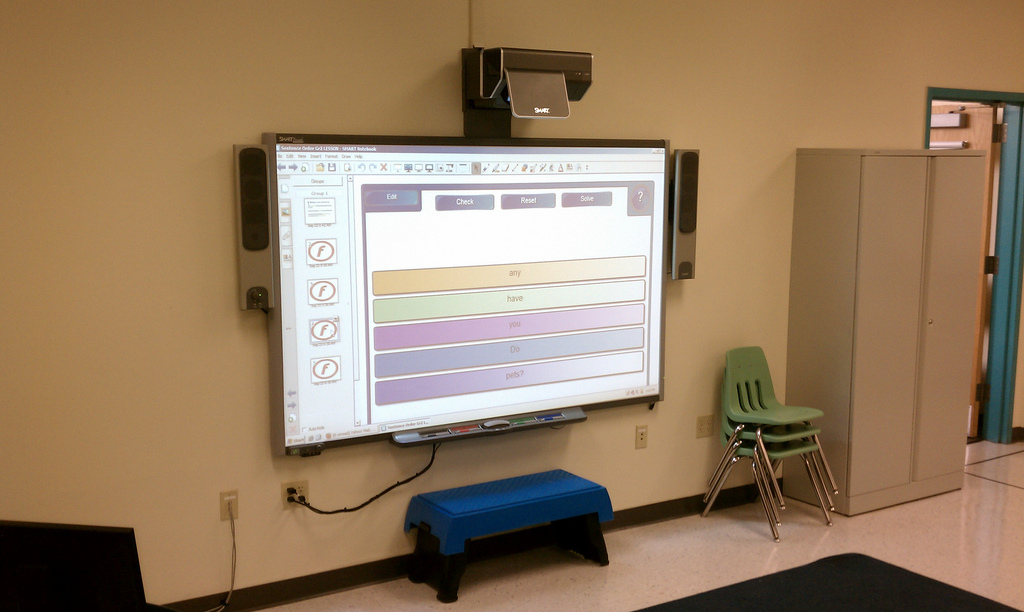
There are different variations of SMART boards on the market. While they all have similar functionality, the way each unit functions can vary. Modern SMART boards come in four different varieties: infrared, resistive, electromagnetic, and ultrasonic.
Infrared
Infrared SMART boards use a computer and projector. The board can be made from any material so long as it is a flat surface. This flexibility allows infrared boards to be installed on top of existing dry erase boards in older classrooms. The projector emits infrared light onto the board; when something touches the board (a pen, finger, or any other object), the system detects that the infrared light is not touching that spot and translates it into a mouse click.
Resistive
Resistive SMART boards are made using a special elastic material along with a metal plate. The elastic stretches over the backplate for protection. When the projector is turned on and the board is touched, the board registers that touch as a mouse click. While the board itself is a bit more heavy-duty than other SMART board options, no other special tools are needed for this type of unit.
Electromagnetic
Electromagnetic SMART boards are solid and contain an array of wires just underneath the surface. These boards come with a special pen made from a material that alters the electrical signals running through the wires. Each alteration tells the board it is being touched; a light touch allows users to write while pressing down on the board triggers a mouse click.
Ultrasonic
Ultrasonic SMART boards use a combination of ultrasonic positioning and infrared light technology. Like electromagnetic boards, ultrasonic boards require the use of a special pen. The board utilizes a combination of light and sound signals to detect when the pen makes contact. Like infrared boards, ultrasonic boards can be displayed on any flat surface.
Pre-Installation Tasks

Each installation is unique, but they all start with the same thing: a site survey. Measuring the scope of your project is critical in determining what tools and equipment will be needed. Setting up a single SMART board in an office meeting room will be a very different project from installing units in every classroom for a newly constructed school. For simple projects like working with existing hardware, a phone call can be all it takes to start the project planning. For more detailed projects, a technician may need to come out and examine the site.
After the survey is complete, our team will formulate a custom plan for your facility. Factors such as the type of SMART board being used, distance between the projector and board, and how the system hardware will interconnect will all be factored in here. Prior to the installation, our team can ship HDMI cables, mounts, brackets, and other necessary equipment directly to the job site. On the day of the installation, make sure there is a way for the installer to access the property. Ideally, this will involve having someone on-hand to let them in. This representative should also be able to point the installer to the work area as well.
Completing the Installation

With the materials already onsite, our technicians will unpackage everything and start prepping the walls by cutting holes for cables and hanging brackets/mounts as needed. Then the hardware will be mounted and connected, with cables being run through the walls, floors, and/or ceiling as needed. Once everything has been cleanly connected, the system will be tested to check functionality. After that, it is a simple matter of cleaning up the area and your new SMART board will be ready to go.
At INC, we perform SMART board installations for schools, universities, business offices, churches, convention centers, and more. A properly installed SMART board not only looks crisp and clean but will also provide key functionality to day-to-day operations. Whether a SMART board is being installed from scratch or tacked onto existing equipment, INC is ready to get the job done right.
If you have additional questions on this process, please call us directly at 888-519-9525 or request a quote here. Our team will work with you to prepare your custom installation project.
Projector Installation

Setting up a projector may seem like a simple project, but there is a fair amount of preparation involved before even starting in earnest. Factors such as where the screen will be placed and the distance between the screen and projector will all need to be taken into consideration. A set-up for a small meeting room will look very different from a reception hall. Projectors can come with different connection types and settings depending on the manufacturer, so it is important to make sure you select a unit that will match up with your other hardware and needs.
The first factor to consider is what the projector will connect to. Typically, a computer is used alongside the projector to display images. Check what kind of connections are on the computer you plan on using (VGA, HDMI, DVI, etc.) and then see if the projector accepts that format. If it does not, you can use an adapter or converter as necessary. If there is an age discrepancy between the devices, such as an older computer paired with a brand-new projector or vice versa, the odds of needing an adapter/converter will increase.
Hanging up a projector can sound easy but it does require some planning. From running cables through the ceiling to adjusting settings and getting the projector configured, installing a projector can quickly transition into an overwhelming project for a non-professional. But before diving into the installation itself, think about how big of a screen you will be using since that will determine the projectors positioning.
Screen Placement vs. Projector Placement

Start by deciding where the projector screen is going to be placed. The average projector today supports high-quality imaging for up to 100 inches (8.33 feet) and most screens are made with that sizing in mind. To keep a screen at a comfortable eye level, the bottom of the screen should hang from 24” – 36” above the ground. The exact placement will depend on the height of chairs or any other seating arrangements.
Next is determining the distance between the screen and projector, referred to as the throw distance. Not every projector has the same throw distance rating, so be sure to check the specs. This number is typically represented as a ratio, with the first number called the throw ratio and the second number being the screen width. For example, say the ratio is 2:1. That means the projector’s distance should equal double the width of the screen. If you had a 50-inch screen, the projector would need to be 100 inches away. These numbers are fairly easy to configure so long as you remember to check the projector specs.
Ideally, a projector should hang exactly where the throw distance says it should. But in real-world settings, other factors need to be taken into consideration. If there are already cables or outlets in the ceiling, their placement could determine where the projector can go. Like many electronics, projectors use fans to mitigate the heat they generate; if a projector is noisy, you may not want it directly over the seating arrangements. Projectors also have settings for vertical offset to tilt the projection up or down when the unit is not completely level with the screen. All of these factors and more are factored into the planning phase during professional installations.
Pre-Installation Tasks

Each installation is unique, but they all start with the same thing: a site survey. Measuring the scope of your project is critical in determining what tools and equipment will be needed. Setting up a single projector in an office meeting room will be a very different project from installing units in every classroom of a newly constructed school. For simple projects like working with existing hardware, a phone call can be all it takes to start the project planning. For more detailed projects, a technician may need to come out and examine the site.
After the survey is complete, our team will formulate a custom plan for your facility. Factors such as the type of mount being used, how high the projector will hang, and whether any cabling needs to be run through the walls will all be factored in here. Prior to the installation, our team can ship HDMI cables, VGA cables, mounts, and other necessary equipment directly to the job site. On the day of the installation, make sure there is a way for the installer to access the property. Ideally, this will involve having someone on-hand to let them in. This representative should also be able to point the installer to the work area as well.
Completing the Installation

With the materials already onsite, our technicians will unpackage everything and start prepping the walls by cutting holes for cables and hanging mounts as needed. Then the hardware will be mounted and connected, with cables being run through the walls, floors, and/or ceiling as needed. Once everything has been cleanly connected, the system will be tested to check functionality. After that, it is a simple matter of cleaning up the area and your new projector will be ready to go.
At INC, we perform projector installations for schools, universities, churches, business offices, convention centers, reception halls, and more. A properly installed projector not only looks crisp and clean but will also provide key functionality to day-to-day operations. Whether a projector is being installed from scratch or tacked onto existing equipment, INC is ready to get the job done right.
If you have additional questions on this process, please call us directly at 888-519-9525 or request a quote here. Our team will work with you to prepare your custom installation project.
TV Installation and Mounting

Setting up a new TV may not seem all that complicated but there is a fair bit of prep work that goes into it. Depending on what the TV will be used for, the size and positioning may change from one project to the next. The type of television used in a waiting room could be very different than something used in a professional meeting room. Not to mention other factors such as what kind of cables will be needed, where the cables will be located, how those cables will be concealed, and what kind of mount may be needed to secure the TV.
TV mounts have become an essential fixture in the age of flat-screen televisions. Hanging a TV on the wall or from the ceiling can save space while providing a sleek, clean look. Angling a mounted TV also prevents any audience members from having to uncomfortably crane their necks to see the screen.
Hanging up a TV mount may sound easy but does require some planning. From finding the studs to measuring a VESA pattern to potentially running cables through the wall, installing a TV mount can be a daunting and time-consuming task for non-professionals. But before getting into the installation itself, it is important to decide what type of TV mount is best for your particular set-up.
Types of TV Mounts

The first thing to consider is whether a wall or ceiling mount will work best. Wall mounts allow TVs to hug the outside of a room, generally taking up less space than a ceiling mount. Some wall mounts come as brackets that are attached to the wall; this type of wall mount can be fixed or tiling. On fixed mounts the TV remains immobile, making them a good choice for televisions that will be hung at eye level. Tilting mounts allow the TV to be tiled down, making them the superior choice when audiences will be looking up at the screen. Alternatively, a third option is an articulating (also called a swing arm) mount. These mounts have a metal “arm” that comes out from the wall and can be adjusted so the TV screen faces different directions.
Ceiling mounts are the other main option for TV mount installation. These mounts are often used in high-ceiling rooms where wall space is limited. They are also used to put TVs in corners where a wall mount cannot fit. Like wall mounts, ceiling mounts can be fixed or tilting. Many units also swivel, allowing the screen to face different directions as needed.
Regardless of whether a wall or ceiling mount is selected, each unit will have two key factors: the weight limit and VESA pattern. The weight limit must always be double-checked before hanging a TV or it could come crashing down onto the floor. “VESA pattern” refers to the screw holes on the back of the TV used to attach the mount. These patterns are set to industry standards but there are different variations depending on the size of the TV, so be sure to select a mount that is compatible.
Pre-Installation Tasks

Each installation is unique, but they all start with the same thing: a site survey. Measuring the scope of your project is critical in determining what tools and equipment will be needed. Setting up a single TV in a doctor’s office waiting room will be a very different project from installing units in every classroom of a newly constructed school. For simple projects like working with existing hardware, a phone call can be all it takes to start the project planning. For more detailed projects, a technician may need to come out and examine the site.
After the survey is complete, our team will formulate a custom plan for your facility. Factors such as the type of mount being used, how high the TV will hang, and whether any cabling needs to be run through the walls will all be factored in here. Prior to the installation, our team can ship HDMI cables, coax cables, mounts, and other necessary equipment directly to the job site. On the day of the installation, make sure there is a way for the installer to access the property. Ideally, this will involve having someone on-hand to let them in. This representative should also be able to point the installer to the work area as well.
Completing the Installation

With the materials already onsite, our technicians will unpackage everything and start prepping the walls by cutting holes for cables and hanging mounts as needed. Then the hardware will be mounted and connected, with cables being run through the walls, floors, and/or ceiling as needed. Once everything has been cleanly connected, the system will be tested to check functionality. After that, it is a simple matter of cleaning up the area and your new TV will be ready to go.
At INC, we perform TV installations for schools, universities, banks, churches, doctor’s offices, retail stores, restaurants, and more. A properly installed TV not only looks crisp and clean but will also provide key functionality to day-to-day operations. Whether a TV is being installed from scratch or tacked onto existing equipment, INC is ready to get the job done right.
If you have additional questions on this process, please call us directly at 888-519-9525 or request a quote here. Our team will work with you to prepare your custom installation project.
Video Conferencing Installation

Video conferencing has become increasingly popular in the last 15 years due to increased convenience from like Skype and Google Hangouts. Although the technology has been around in one form or another since the 1970s, the advent of free Internet services has made public interest skyrocket. With technology continually advancing, video conference systems see widespread use today in business offices, schools, churches, and more.
Although anyone with a cell phone can use video communications today, there is a bit more sophistication to a true video conference system. Basic video conference systems run through a computer, using software and a webcam to transform the computer into a video conferencing device. This type of system can be on the low end of audio/video quality but is a good option to consider when budgeting or using a temporary set-up.
A dedicated video conference system will have permanent equipment installed. This type of system is generally used in locations where the video conference system will be used on a regular basis, such as an office meeting room. Special cameras in these set-ups are mounted to a fixed point but rotate via remote to focus on different parts of the room as needed. The audience in the room will generally use a large television or projector to display the people on the other end of the video call.
Video Conference vs. Telepresence

There are a few other terms out there that interchange with “video conference”, the most prominent of which is “telepresence”. A telepresence system is the big brother of video conferencing, featuring newer technology. Telepresence features clearer video, crisper audio, and superior connectivity. Using cloud-based technology, telepresence lacks the connectivity issues that can cause audio or video to unsync, dropped connections, or other problems that can crop up with subpar video conference systems.
Recently, telepresence has also been combined with other new technologies such as robots. Telepresence robots can be remotely controlled, allowing presenters to “walk around” on a stage for audiences even when they are not physically present. This allows for more hands-on interaction that can provide increased benefits over video conference in areas such as education.
Pre-Installation Tasks

Each installation is unique but they all start with the same thing: a site survey. Measuring the scope of your project is critical in determining what tools and equipment will be needed. Setting up a temporary teleconference system for a one-night event will be very different from installing something high-end and permanent. For simple projects like working with existing hardware, a phone call can be all it takes to start the project planning. For more detailed projects, a technician may need to come out and examine the site.
After the survey is complete, our team will formulate a custom plan for your facility. Factors such as the lighting in the room, default camera settings, and how the system hardware will interconnect will all be factored in here. Prior to the installation, our team can ship HDMI cables, mounts, brackets, and other necessary equipment directly to the job site. On the day of the installation, make sure there is a way for the installer to access the property. Ideally, this will involve having someone on-hand to let them in. This representative should also be able to point the installer to the work area as well.
Completing the Installation

With the materials already onsite, our technicians will unpackage everything and start prepping the walls by cutting holes for cables and hanging brackets/mounts as needed. Then the hardware will be mounted and connected, with cables being run through the walls, floors, and/or ceiling as needed. Once everything has been cleanly connected, the system will be tested to check functionality. After that, it is a simple matter of cleaning up the area and your new video conference system will be ready to go.
At INC, we perform video conference installations for schools, universities, offices, churches, hotels, news stations, and more. A properly installed video conference system not only looks crisp and clean but will also provide key functionality to day-to-day operations. Whether a video conference system is being installed from scratch or tacked onto an existing network, INC is ready to get the job done right.
If you have additional questions on this process, please call us directly at 888-519-9525 or request a quote here. Our team will work with you to prepare your custom installation project.
Wi-Fi Installation

As mobile devices have become more prominent over the years, Wi-Fi has become critical for any organization wanting to keep up with the latest technology. From a small coffee shop to a massive hotel, businesses of all sizes use Wi-Fi to stay on top of their game. At INC, we design custom installation plans to maximize the effectiveness of Wi-Fi functionality in your building.
Advantages of Wi-Fi

Having been around for 20 years, Wi-Fi is a tried and tested technology in the modern world. Most electronics today, from cell phones to laptops to televisions, are built with Wi-Fi receivers. Wireless functionality results in a number of benefits for users:
- Carry and use devices with network access anywhere in the building.
- Allow network access on devices too small to house an ethernet port.
- Provide easy access to new users and guests with simple interfaces for connectivity.
In terms of convenience, Wi-Fi wins out over older, wired connections.
Pre-Project Tasks
Before installation, there is a bit of prep work that goes into planning a Wi-Fi network. The job site will need to undergo two surveys: a cabling survey and a wireless survey. The cabling survey will examine the cabling infrastructure to determine where the wireless equipment can be most easily installed. This includes planning new cable runs to put the Wi-Fi equipment in the selected location.

The wireless survey focuses on your specific needs. Wi-Fi signals come in different strengths and the layout of the building will determine how the project needs to proceed. The construction of the facility also factors in here; thinner materials like drywall are easier for a signal to penetrate than more solid materials like concrete.
Wi-Fi signals also get weaker with distance, so larger buildings naturally need more powerful equipment. For example, a small office with ten people will require less overhaul than a school housing dozens of staff and hundreds of students. These factors and more make floor plans and related materials immensely helpful when conducting a wireless survey.
Once both surveys have been completed, our team of experts can formulate the best possible layout for the equipment installation. Equipment recommendations will be based on the performance needs of the wireless network. Factors such as data speeds, coverage areas, and security must all be taken into consideration. With those details ironed out, materials and equipment will be shipped directly to the job site for our installation team.
Completing the Installation
With the materials onsite, our technicians will run any new ethernet cable that is needed. Each new cable will be kept hidden and arranged neatly to preserve the aesthetics of the building. Then the modems, routers, antennas, and other hardware will be mounted and connected to the ethernet lines, getting the new wireless network up and running. These access points will be activated by our team, who will install any necessary security, firmware, and other software updates.
Each piece of new equipment is tested to ensure functionality and configure the new wireless network according to client specifications. This can include incorporating the Wi-Fi into your existing network when upgrading older systems. Once our technicians finish, your new Wi-Fi network will be up and running.
At INC, we perform Wi-Fi installation for offices, educational facilities, residential buildings, industrial plants, and more. Using wireless networks can make life easier on employees, enabling Internet access anywhere in a building for access to email, internal documents, and more. Whether a Wi-Fi system is being installed from scratch or tacked onto an existing network, INC is ready to get the job done right.
If you have additional questions on this process, please call us directly at 888-519-9525 or request a quote here. Our team will work with you to prepare your custom installation project.